


AI Face & Color Analysis App
3.811.00 Reviews
App Specs
- Version
- 2.2.5
- Updated On
- License
- Free
- Downloads
- 500,000+
- Developer
- ai ito
- Categories
- Beauty
- Platform
- Android, iOS
Screenshots
 Analysis by AppCompare
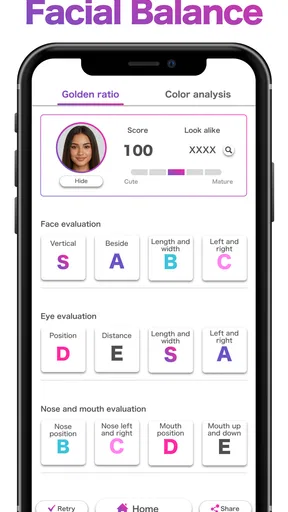
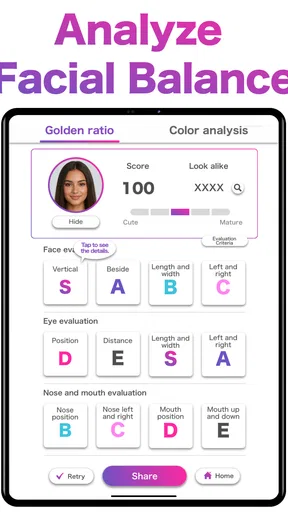
When an AI face reading gives you an answer that feels off, it is tempting to blame the result—or to keep taking selfies until you get one you like. I’d pause first. Lighting, camera angle, and the way a photo is framed can all change how a face appears, so a result is best treated as a prompt for curiosity rather than a verdict about your looks. That distinction matters especially with an app built around face scores, facial shape, personal color, and the golden ratio.
Start with a photo you can compare
Before trying to make sense of any analysis, choose a straightforward selfie: face the camera, keep your expression relaxed, and use even light rather than strong shadows or a colored lamp. These are practical photo-taking tips, not special app requirements. Their value is that they give you a steadier point of comparison if you later try another image. Changing the pose, light, and camera distance all at once makes it difficult to tell what caused a different result.
I’d also separate curiosity from decisions. An AI color suggestion can be a useful nudge when you are choosing between two lipstick shades or planning an outfit, but it should not decide what you must wear. Your own comfort, taste, and the actual look of a color in daylight matter more than a single reading. Likewise, a face score is not a measure of worth, health, or attractiveness in any objective sense.
When a reading seems inconsistent
If one photo suggests a different face shape or palette from another, I would not immediately assume either result is definitive. Try comparing images taken under similar conditions, and change only one thing at a time. For instance, keep the lighting and camera position steady while changing your expression. That makes the comparison more useful than collecting a pile of unrelated selfies and trying to average their results in your head.
It is also worth asking what you want from the app before you open it. If you are looking for a quick source of outfit inspiration, color analysis may be the most practical place to begin. If you want a dependable skin assessment or personalized psychological insight, this is not the right tool: an AI-generated reading is not a substitute for a qualified professional, and entertaining personality interpretations should be taken lightly.
A low-pressure way to use the results
One useful workflow is to treat a suggestion as a small experiment. If the app points you toward a color you rarely wear, try it with an accessory or a top you already own before buying anything new. Look at it in the mirror and in ordinary daylight, then decide whether you like the effect. That approach keeps the app’s ideas inexpensive and personal instead of turning a screen result into a shopping checklist.
For a more meaningful comparison, save the context in your own mind: which photo you used, what the light was like, and what you were trying to learn. You do not need to make the process elaborate. A simple note such as “window light, choosing between two colors” can help you distinguish a genuinely helpful suggestion from a result that merely changed because the photo did.
Worth Reading Before You Choose

Flipboard Shows What News Apps Must Do Beyond the Feed

Switching to Android Auto Means Rethinking Your Driving Routine

Google Calendar Makes a Crowded Week Easier to Manage

Ludo King Makes the Most of the Minutes Between Plans

Baby Panda World Brings Quick Play to Modern Phones, but Its Game Library Feels Busy

ESPN’s Live Game View Makes Following Close Games Easier
Those checks also help when the app feels confusing or gives you an unexpected answer. Make sure you are using a clear, well-lit image, then try again without changing several conditions at once. If the experience still does not fit what you need, it may be better to stop rather than keep retaking photos in pursuit of a preferred score. Repeated attempts do not turn an approximate reading into professional advice.
Ever wondered what your face says about you? Or maybe you're just curious about how colors can change the vibe of your selfies? Well, let me introduce you to the AI Face & Color Analysis App. This little gem popped up on my radar recently, and I've been having a blast diving into everything it offers. So, grab your phones and let’s explore this cool app together!
Getting Started with AI Magic
First things first, downloading the AI Face & Color Analysis App is a breeze. Available for both Android and iOS, you can snag it from the usual app stores. Once you've got it installed, it's time to jump in and start exploring its features. The app's interface is pretty user-friendly, so you won’t find yourself lost in a maze of options.
Face Analysis: What’s in a Look?
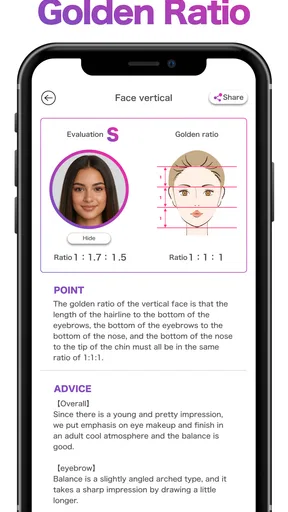
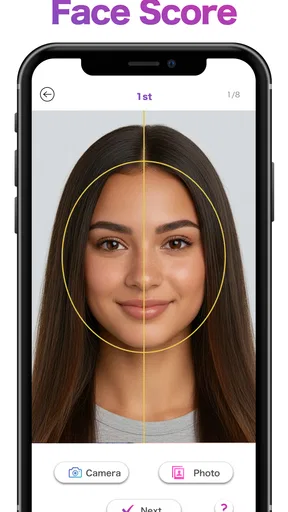
One of the standout features of this app is the face analysis. It’s a bit like having your own personal dermatologist and psychologist rolled into one. You simply snap a selfie, and the app goes to work. It analyzes everything from skin type to facial symmetry, and even gives you fun insights into what your facial features might say about your personality.
Now, I know what you’re thinking—this sounds a bit too sci-fi, right? But honestly, the results are pretty fascinating. I found myself nodding along with some of the personality insights, thinking, "Wow, this app really gets me!" Just remember, it’s all in good fun and not a replacement for any professional advice.
Color Analysis: Find Your Perfect Palette
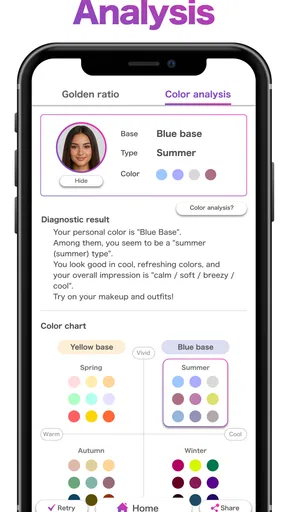
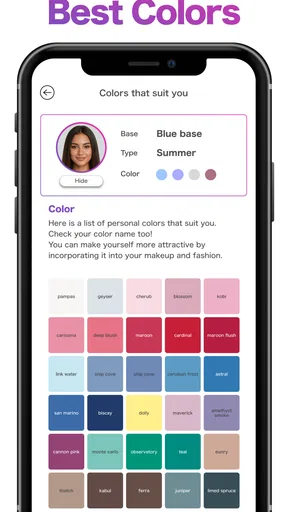
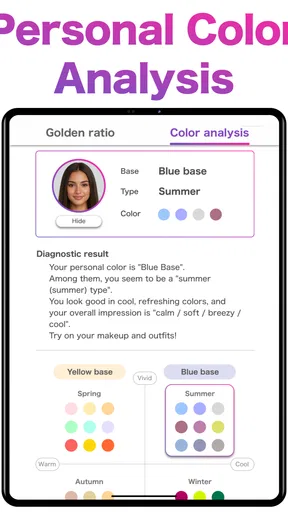
Next up, let’s chat about the color analysis feature. If you’ve ever struggled to find the perfect shade of lipstick or the right color for a new outfit, this feature might just become your new best friend. The app analyses your skin tone and suggests colors that complement you best.
I played around with this feature a lot, and I have to say, it’s pretty spot-on. It even gave me some great ideas for revamping my wardrobe, and who doesn’t love a good excuse to go shopping? Plus, it’s really fun to see how different colors can change the entire mood of a photo.
Extra Features and Fun
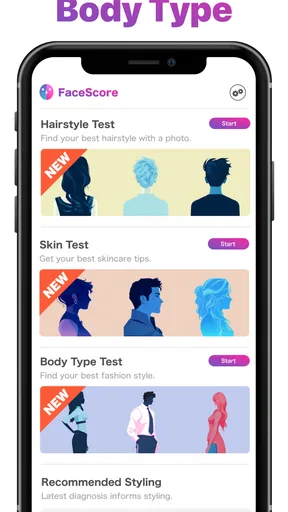
Aside from the main attractions, the app is packed with a bunch of other nifty features. There’s a section for beauty tips based on your analysis results, which is a nice touch. Whether you’re looking to tweak your skincare routine or try out a new makeup trend, there’s plenty of advice to sift through.
And let’s not forget the social sharing options. Once you’ve got your analysis results, you can share them with friends or on social media. It’s a fun way to compare notes and see how your results stack up against your pals.
What it costs and who it suits
For a quick reality check before downloading, this is a free beauty app from ai ito, with in-app purchases listed at $4.49 per item. The age rating is Everyone, and the current version is 2.2.5, with Android 9 as the minimum operating system. I’d start with the free experience and decide whether any paid item is useful to you rather than assuming you need to spend money to get value from the idea.
The app has a 3.8 average from around 2.8 thousand ratings and has passed 500 thousand installs. Those figures suggest that plenty of people have tried it, but they do not tell you whether its particular readings will suit your face or taste. I would judge it by whether its suggestions give you a fresh idea, not by treating popularity as proof of accuracy.
This is most appealing if you enjoy experimenting with appearance and want a playful starting point for choosing colors or thinking about facial proportions. It is less suitable if you want a professional color consultation, medical skin guidance, or a rigorous measurement tool. Compared with a basic photo editor, the emphasis here is interpretation rather than simply changing an image; compared with asking a friend, it offers a structured set of AI-generated prompts, but it cannot replace another person’s taste or your own judgment.
Everyday use without overthinking it
Picture getting dressed for work and hesitating between a familiar neutral top and a brighter color. You could use the palette suggestion to pick one option, then check it in the room where you will actually wear it. If the color looks good to you, that is a useful outcome; if it does not, you have learned something about your preferences without needing to buy a new wardrobe. The same low-stakes approach works for choosing a lipstick shade before an event.
There is a trade-off in sharing results, too. Comparing readings with friends can make the experience more fun, but a side-by-side face score can also invite unhelpful competition. I would share only what feels comfortable and keep the conversation focused on color ideas or playful observations, not on ranking anyone’s appearance. A score is a feature of an app, not a measure of a person.
Wrapping Up the Experience
All in all, the AI Face & Color Analysis App is a delightful mix of tech and fun. It’s perfect for those moments when you’re feeling a bit curious about yourself or just want to play around with some new colors. The app manages to balance being informative and entertaining, which is no small feat.
If you’re looking for an app that’s a bit different from the usual fare, give this one a try. It’s a neat way to spend some time, and who knows? You might just discover something new about yourself along the way. Happy analyzing!
Pros
- Accurately detects facial features.
- Provides detailed color analysis.
- User-friendly interface design.
- Fast processing times.
- Offers insightful beauty tips.
Cons
- Limited free version features.
- Occasional inaccurate color detection.
- Intrusive ads in free version.
- Requires strong internet connection.
- High battery consumption.
FAQs for AI Face & Color Analysis App
What features does the AI Face & Color Analysis App offer?
The AI Face & Color Analysis App provides a range of features including facial symmetry evaluation, skin tone detection, and personalized color palette recommendations. It also offers insights into the ideal makeup or clothing colors that suit your complexion. Users can take advantage of its user-friendly interface for quick and accurate results.
Is the AI Face & Color Analysis App suitable for all skin types and tones?
Yes, the app is designed to cater to a diverse range of skin types and tones. Its advanced AI algorithms ensure accurate analysis regardless of your unique complexion. The app continuously updates its database to enhance compatibility with various skin colors, making it inclusive and reliable for all users.
How accurate are the color recommendations provided by the app?
The AI Face & Color Analysis App uses sophisticated machine learning models to deliver highly accurate color recommendations. While the app strives for precision, user feedback suggests that results may vary slightly due to lighting conditions or camera quality. However, the app generally provides reliable guidance for enhancing your personal style.
Does the app require an internet connection to function?
The app performs most of its core functions offline, utilizing preloaded AI models for analysis. However, an internet connection is necessary for accessing additional features, updates, and cloud-based services. Ensuring your device is connected will enhance the app's performance and provide access to the latest improvements.
Is user data safe with the AI Face & Color Analysis App?
The app prioritizes user privacy and data security. It employs encryption protocols to protect personal information and facial data. The app does not store images permanently and allows users to manage their data preferences. Regular security updates are implemented to safeguard user information from potential threats.


